
Streamlined Event Registration
From Sign-Up to Check-In
Manage attendee registrations in real time — track sign-ups, filter by payment status, bulk-import attendees, build custom forms with conditional logic, and export clean data in one click.
Every attendee. Every detail. Tracked in real time
Everything You Need for Event Registration
From the moment someone registers to the moment they scan in — EventHex tracks every attendee, every ticket type, and every payment status in one real-time dashboard.
Per-Ticket Attendee Lists
View and filter attendees by ticket type, session, or table assignment
Real-Time Tracking
Watch registrations come in live — no page refresh needed
Payment Status Filtering
Filter by paid, pending, or complimentary to manage follow-ups
Check-In Monitoring
See who has checked in and who is still pending arrival
Attendee Search & Export
Find any attendee instantly and export lists to CSV or Excel
CSV / Excel Import
Bulk-add attendees by uploading a spreadsheet in seconds
Duplicate Detection
Automatic deduplication flags repeated emails before import completes
Field Mapping Wizard
Map any column from your spreadsheet to EventHex fields with a visual editor
Bulk Registration
Register entire groups, teams, or organizations in a single operation
Import History
Full audit log of every import with row-level error reporting
Custom Registration Fields
Add text, dropdown, checkbox, file upload, or date fields to any registration form
Conditional Logic
Show or hide fields based on ticket type, answers, or participant category
Form Builder
Drag-and-drop form editor with live preview and mobile-optimized output
GDPR Consent Fields
Built-in consent checkboxes, opt-in language, and data retention controls
Multi-Ticket Registration
Let one buyer register multiple attendees in a single checkout flow
Powerful Registration Features in Action
Live Attendee Data As Registrations Happen
Every form submission updates the dashboard immediately — ticket counts, payment totals, and attendee lists refresh in real time so you're never working with stale data.
Explore More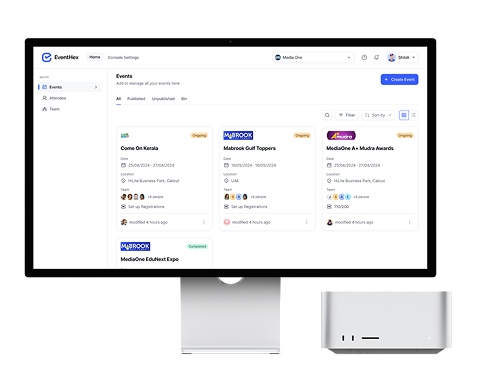
Import Thousands of Attendees in Seconds
Upload a CSV or Excel file and EventHex handles the rest — mapping columns, detecting duplicates, and creating clean attendee records with zero manual data entry.
Explore More
Registration Forms Built Exactly Your Way
Go beyond name and email — build forms with custom fields, conditional logic, multi-ticket flows, and GDPR consent controls. No developer required.
Explore More
How Event Registration Works
Create Your Event & Tickets
Set up ticket types, capacities, prices, and registration form fields — including custom questions unique to your event.
→Share Your Registration Link
Publish your event page and share the direct registration URL across email, social, and your website.
→Track Attendees in Real Time
Watch registrations arrive live. Filter by ticket type, payment status, or check-in status. Export any view instantly.
→Import Offline Registrants
Bulk-import attendees from spreadsheets, with automatic duplicate detection and field mapping.
Why Organizers Choose EventHex Registration
Real-Time Tracking
Live registration data with no page refresh needed
Bulk Import
CSV import with duplicate detection and field mapping
Form Builder
Custom fields, conditional logic, and GDPR consent
Easy Export
One-click CSV/Excel export of any attendee list
Data Accuracy
Duplicate detection and validation at every step
Ready to Simplify Attendee Registration?
See how EventHex turns messy spreadsheets and manual follow-ups into a clean, automated registration workflow.
How do I manage event registrations?
EventHex provides a real-time dashboard where you can view all attendees by ticket type, filter by payment status, search for specific attendees, and export lists at any time. All data updates instantly as registrations come in.
Can I import attendees from a spreadsheet?
Yes. Upload a CSV or Excel file and use the visual field-mapping wizard to match your columns to EventHex fields. Duplicate emails are automatically flagged before import completes.
How does duplicate detection work?
During bulk import, EventHex checks every email address against your existing attendee list and flags any duplicates before they're added. You can choose to skip, merge, or override duplicate records.
Can I create custom registration forms?
Yes. The form builder lets you add text fields, dropdowns, checkboxes, file uploads, and date pickers. You can apply conditional logic to show or hide fields based on ticket type or previous answers.
How do I track check-in status?
The registration dashboard shows a real-time check-in column for every attendee. You can filter to see who has arrived, who is still pending, and who is a no-show — and export the filtered list at any time.
Is EventHex GDPR compliant?
Yes. Registration forms include built-in GDPR consent checkboxes with customizable opt-in language. EventHex supports data retention policies and provides tools to handle data subject access requests.