
All Your Events. One Dashboard.
Full Control.
Manage your entire event portfolio from a single organizational dashboard — clone events, manage teams, set role-based permissions, track subscription usage, and customize your brand across all events.
One organization. Every event. Total control
Everything You Need in a Centralized Dashboard
From your org dashboard, clone last year's event in one click, assign team members to specific events, track subscription usage, and enforce brand consistency across your entire portfolio.
Event Portfolio View
See all your events in one list view — with status, registration counts, and revenue at a glance
One-Click Event Cloning
Clone any past event to reuse its setup, form fields, email templates, and content
Cross-Event Analytics
Compare registration trends, attendance, and revenue across your full event portfolio
Bulk Operations
Apply settings, templates, or team assignments across multiple events simultaneously
Event Categories
Organise events by type, department, or recurring series for easier management
Role-Based Access
Assign Admin, Manager, Marketer, Scanner, or View-Only roles with granular permission control
Team Member Invites
Invite team members by email — they get instant access with the permissions you set
Event-Level Admins
Assign an event-specific admin to manage one event without accessing others
Activity Logging
Full audit trail of who changed what and when across all events in your organization
Permission Templates
Save common permission sets as templates and apply them to new team members instantly
Brand Customization
Set org-wide logo, brand colours, email sender name, and footer for all events
Custom Terminology
Rename attendees, tickets, sessions, and other terms to match your organization's language
Billing & Subscription
Manage your EventHex subscription, view invoices, and update payment details from org settings
Usage Tracking
Monitor events created, registrations processed, emails sent, and storage used against your plan
Domain Management
Configure custom event subdomains and sender email domains for all events in your org
Dashboard Features That Save Time
Next Event Setup in Under 60 Seconds
Recurring events shouldn't require starting from scratch. Clone any past event and carry forward the setup, registration form, email templates, ticket types, and speaker structure.
Explore More
Right Access. Right People. Right Events.
Give your marketing team edit access only to event websites. Give check-in staff scanner-only access. Give your CEO view-only across everything. All from one permission panel.
Explore More
Your Brand. Across Every Event Surface.
Set your organisation's logo, brand colours, custom email domain, and sender name once — and every event inherits those settings automatically.
Explore More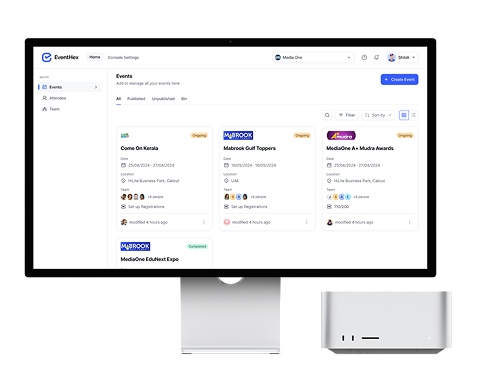
How the Centralized Dashboard Works
Set Up Your Organization
Create your organisation profile, set your brand assets, and configure your custom domain and email sender settings.
→Create or Clone Events
Start a new event from scratch, or clone a past event to reuse its full setup in one click.
→Invite and Assign Your Team
Invite team members with role-specific permissions. Assign people to specific events or give org-wide access.
→Monitor Your Portfolio
Track all events from the portfolio dashboard — registrations, revenue, and upcoming milestones across your full calendar.
Why Organizers Choose EventHex Dashboard
Portfolio View
All events in one list with live status and metrics
Event Cloning
Reuse any past event setup in one click
Role-Based Access
5 permission levels with event-level scoping
Brand Consistency
Org-wide branding applied to every event
Cross-Event Analytics
Portfolio-level view of registration and revenue trends
Ready to Manage All Your Events From One Place?
See how EventHex centralised dashboard gives organizers full visibility, team control, and brand consistency across every event.
What is the centralized event management dashboard?
The EventHex centralized dashboard is an organization-level control panel where you manage your full event portfolio — creating and cloning events, managing team access, tracking usage, and enforcing brand consistency across all events.
How does event cloning work?
Select any past event and click Clone. EventHex creates a new event with all the same settings — ticket types, registration form fields, email templates, session structure, and page content. Update the dates and you're ready to go live.
How do I manage team permissions?
Invite team members by email and assign them a role: Admin (full access), Manager (create and edit events), Marketer (marketing campaigns only), Scanner (check-in access only), or View-Only. You can also scope roles to specific events.
Can I manage multiple events from one account?
Yes. The EventHex organization dashboard shows all your events in a single portfolio view with live status, registration counts, and revenue. You can create, clone, archive, and manage events without switching accounts.
Can I use my own domain and email sender?
Yes. EventHex supports custom subdomains for event pages (events.yourcompany.com) and custom sender email domains (rsvp@yourcompany.com). Both can be configured in organization settings.