
Build Event Forms by Speaking.
Go Live in Minutes.
Describe your form in plain English and AI builds it instantly — with the right field types, conditional logic, GDPR consent, and multi-language support. No drag-and-drop experience required.
Any form. Any field. Built in seconds
Everything You Need in an AI Form Builder
From a 3-field sign-up to a 30-field speaker application with conditional logic and file uploads — describe what you need and AI builds it. Then tweak it visually with the drag-and-drop editor.
Speak to Create Forms
Describe your form in plain English and AI generates the right fields, types, and structure instantly
AI Field Detection
AI identifies the right field type for each data point — text, date, dropdown, file upload, or phone
Natural Language Processing
Use conversational language — 'ask them to upload a headshot' turns into a file-upload field
Template Suggestions
AI suggests matching templates based on your description for faster form creation
Multi-Language Voice
Create forms in any language by speaking in that language — AI processes and builds correctly
Drag-and-Drop Editor
Add, reorder, and style form fields with a visual editor after AI generates the initial structure
Conditional Logic
Show or hide fields based on previous answers, ticket type, or attendee role
Custom Field Types
20+ field types including ratings, NPS, signature capture, QR scan, and table inputs
Form Templates
50+ pre-built templates for registration, feedback, surveys, speaker applications, and more
Pre-Fill from Registration
Auto-populate form fields with data the attendee already provided at registration
Email Notifications per Submission
Send automatic confirmation emails to submitters and alert emails to your team
WhatsApp Notifications
Trigger WhatsApp messages to attendees or team members on form submission
GDPR Consent Management
Built-in consent checkboxes with customizable opt-in language and data retention controls
Captcha Protection
Automated bot protection on all public forms with invisible reCAPTCHA integration
Approval Workflows
Route submissions to an approver before they're confirmed — ideal for speaker and exhibitor applications
AI Form Builder Features in Action
Your Words Become Working Forms
Open the form builder, speak your requirements, and watch AI assemble the form in real time — with the right field types, validation, and structure. Edit anything visually afterward.
Explore More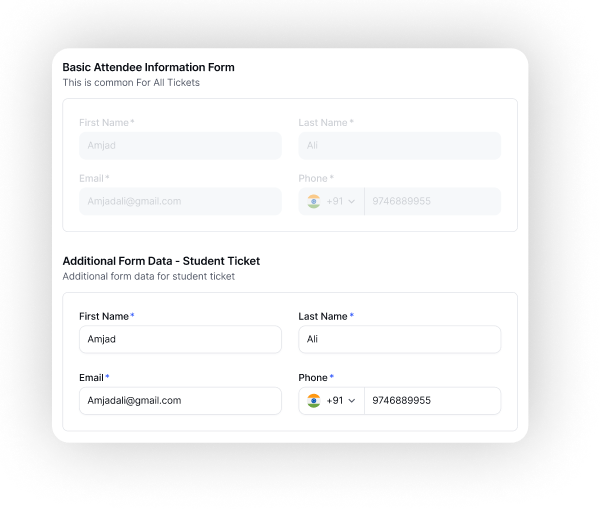
Smart Forms That Adapt to Every Attendee
Don't show every attendee every question. Add conditional logic to show or hide fields based on ticket type, role, or previous answers — for a cleaner, faster form experience.
Explore More
Forms That Route to the Right Person
For speaker applications, exhibitor sign-ups, and grant requests — route form submissions through an approval workflow before confirmation is sent. All within EventHex.
Explore More
How AI Form Builder Works
Speak or Select a Template
Describe your form in plain English or choose from 50+ pre-built templates. AI generates the initial form structure instantly.
→Customise with Drag-and-Drop
Refine the AI-generated form — add conditional logic, reorder fields, adjust labels, and set validation rules.
→Configure Notifications and Workflows
Set up submission notifications via email or WhatsApp. Add approval workflows for forms that require review before confirmation.
→Publish and Collect Submissions
Embed the form on your event page, share a link, or use it in-app. View and export all submissions from the dashboard.
Why Organizers Choose EventHex Form Builder
Voice Creation
Build forms by describing them in plain English
Drag-and-Drop Editor
20+ field types with live visual preview
Conditional Logic
Smart forms that adapt to attendee responses
GDPR Ready
Built-in consent fields and data retention controls
Approval Workflows
Multi-stage approval routing for sensitive forms
Ready to Build Forms in Under a Minute?
See how EventHex AI Form Builder turns form creation from a chore into a 60-second task — with conditional logic, approval workflows, and GDPR compliance built in.
How does the AI form builder work?
You describe the form you need in plain English — either by typing or speaking. The AI identifies the required fields, selects appropriate field types, and generates the form structure instantly. You can then edit it visually with the drag-and-drop editor.
What types of forms can I build?
You can build registration forms, session feedback surveys, speaker and exhibitor applications, workshop sign-up forms, satisfaction surveys, lead capture forms, and any other custom form your event requires.
What is conditional logic in forms?
Conditional logic lets you show or hide specific form fields based on previous answers. For example, show a dietary preference field only when the attendee selects a catering option, or show speaker bio fields only when the ticket type is Speaker.
How do approval workflows work?
When you enable an approval workflow on a form, submissions go into a pending state. Approvers receive an email notification with a one-click approve or reject action. Once approved, the submitter receives their confirmation email automatically.
Is the form builder GDPR compliant?
Yes. Every form can include GDPR consent checkboxes with customizable opt-in language. EventHex supports granular consent categories, data retention settings, and tools to handle data subject requests.
Can forms be submitted via WhatsApp?
EventHex supports WhatsApp notifications on form submission — sending confirmation messages to submitters and alert messages to your team. Full WhatsApp-based form flows are available via the EventHex WhatsApp integration.